Try GanttRight Free for 30 days.
Plan the tasks. Seamlessly build your timeline.
- Enter the work on cards within the Task Flow board.
- Link tasks together, then find the critical path in one click.
- Every task arrives in your Gantt Chart linked & adjustable.
Start planning today — free for 30 days.
The Whole App
Every feature, every template, every bonus. Nothing locked, nothing watermarked, and no card details to begin. If you never buy it, the trial simply ends.
Buy Once
One payment, and every update to the version you buy is included for as long as that version is supported.
Nothing Renews
No monthly bill, no seat count, no rising price at renewal, because there is no renewal. Windows handles the Store license the same way it does for any app you buy there.
GanttRight is sold through the Microsoft Store, so Microsoft takes the payment and handles refunds under the Microsoft Store Terms of Sale. Microsoft treats digital apps as generally non-refundable except where your local consumer law says otherwise. In many countries it does. That is precisely why the trial runs a full 30 days with no card — decide before any money changes hands, not after.
Why Plan with GanttRight
Instead of typing dates first and getting a bar chart back, you plan the tasks first. The timeline then builds from the work you entered — every card becomes a bar, every link becomes a dependency, with nothing typed twice.
Drag across a time period
That gesture creates the task and schedules it at once. Start, Finish, and Duration are optional columns you can switch on and type into, but nothing makes you fill in a form before you can see your plan.
Float is a handle
Other tools calculate float and print you a number. Here it is a track with two draggable ends — push one and see immediately what it costs.
What you see is what you change
Every part of the plan is edited where it is drawn. The bar is the duration, the arrow is the dependency, the diamond is the milestone — change them by moving them. There is no properties dialog holding the real values somewhere behind the picture.
The chart picks up where the board leaves off
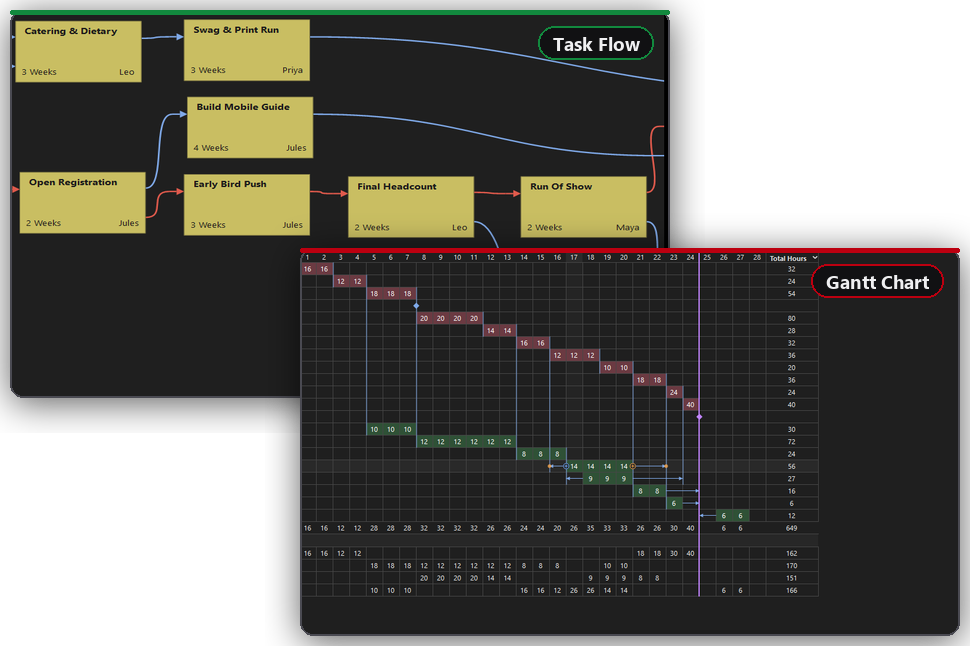
Task Flow shows what feeds what. The Gantt shows when. What you shape on the board arrives in the chart already linked, with the same rules refusing the same impossible links. Nothing is re-entered and nothing is rebuilt.
Everything about a task, in one place
Select any task and the Task Inspector opens it in full: the lead who owns it, its schedule and lag, what it waits on, hours and cost, notes, risks, and whether it is blocked and why. The record lives with the task instead of in a separate document nobody updates.
Watch what follows
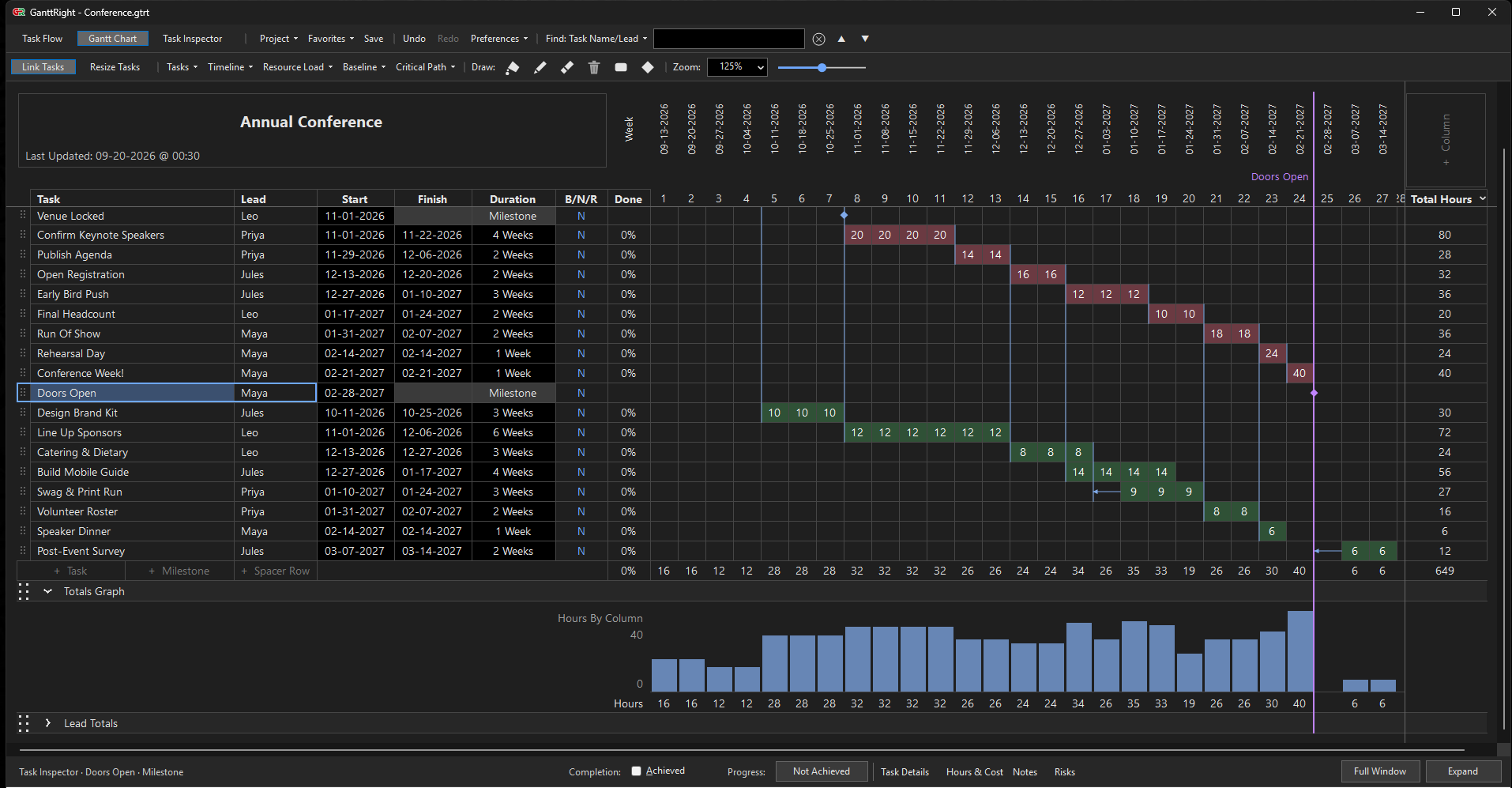
Drag a critical block and its whole chain moves. Drag a floating one and it slides inside its own slack. It is the fastest way to understand any plan, including one you inherited.
- Critical — the longest path to project completion
- Floating — has room to move
- Milestone — a moment to hit
How the Trial Works
Download and open it
Install it from the Microsoft Store, which uses your Microsoft account as it does for any app. There is no separate GanttRight account, no activation key and no card. Open a template and start dragging.
Use it on real work
Not a demo project — plan something you actually have to deliver. That is the only test that tells you anything.
If it's worth it, buy it
After 30 days the trial ends. Buy once, through the Microsoft Store, if it earned its place. If not, nothing happens and nothing was charged.
What You Get
From the first day of the trial, you get everything. There is no reduced trial edition — you are using the software people pay for.
- The full application. Gantt chart, Task Flow board, Task Inspector, resource load, baselines, critical path discovery, and the Project Brief.
- Plan first, dates later. Start on the Task Flow board with no dates at all. When the shape is right, Build Schedule turns the whole board into a real timeline in one step.
- The critical path in one click. Find the chain that decides your finish date, confirm it, then reorganize the plan around it as a single undoable step.
- Everything edits by hand. Drag to create, move, link and resize. Type hours and costs straight into the row, with the totals moving as you type.
- See an overload before you promise. Resource Load totals the hours by column and by person, and flags anything over the capacity you set.
- A Project Brief to hand over. A paginated report generated from the plan, for the people who will never open the app.
- Try before you buy. You decide if GanttRight is worth keeping.
When You Buy. One payment. Yours forever.
Not a subscription. Nothing renews.
A future major version would be a separate, optional purchase.
Install from the Store to begin the 30-day free trial. Buy from inside the app when you are ready — no card needed to start.
- 30 days free, no card to start
- Works offline, forever
- Your plans stay on your machine
- Built for the solo project planner
- Updates to this version included
What One Payment Covers
No renewal, no seat count, and no second invoice. Here is how that sits against paying every month.
GanttRight
- Pay once
- Works with no internet connection
- No GanttRight account and no seat count
- Plans are files on your disk that you own
- Nothing stops working later, because there is no subscription
Runs on Windows. One planner, one machine, one file.
A Monthly Subscription
- Billed per person, every month
- Access runs only while the subscription is paid
- An account and a counted seat are required
- Plans usually live on the provider's server
- Access ends when the subscription ends
A different trade: an ongoing cost for ongoing delivery.
Frequently Asked Questions (FAQ)
Including the awkward ones: what happens when the trial ends, what the price does and does not include, and how refunds work through the Microsoft Store.
Do I need a credit card to start the trial?
No. Download it and use it. We ask for nothing to begin. That means there is nothing to cancel and no way to be charged by accident.
Is the trial a limited version?
No. Every feature is in the app itself, with nothing watermarked or locked. A trial that hides the good parts tells you nothing about whether the tool suits you.
What happens after 30 days if I don't buy?
The trial ends and the application stops opening. Your plan files stay exactly where they are, on your disk, in a readable format. Nothing is deleted and nothing is held hostage — buy later and they open again.
Is it really a one-off payment?
Yes — one payment, the figure shown above. No subscription, no renewal, no per-seat charge. Nothing bills you again for the version you bought.
Does the price include future major versions?
No. We would rather be straight about it. Your purchase includes every update to the version you bought — fixes, refinements, and improvements — for as long as that version is supported. A future major version is a separate, optional purchase. If you never buy it, the one you own keeps working exactly as it does today, forever. We are not going to switch off software you paid for.
How do refunds work?
GanttRight is sold through the Microsoft Store, so Microsoft takes the payment and Microsoft decides refunds under the Microsoft Store Terms of Sale. Microsoft treats digital apps as generally non-refundable except where your local consumer law says otherwise — and in many countries it does, so check your own rights. We never receive your payment, so we are not able to refund it ourselves. This is exactly why the trial is a full 30 days with no card: decide before any money changes hands, not after.
Do I have to fill in start dates and durations?
No. Drawing a bar sets both. Start, Finish, and Duration are optional columns you can switch on when you want to type an exact date, and switch off when you don't.
Can I plan before I know any dates?
Yes — that is what Plan First is for. Start a project in Plan First and you get an empty board where you name tasks, give rough duration estimates and connect them, with no dates at all. When the shape is right, Build Schedule previews real dates and you apply them in one step.
Why did my task refuse to link?
A link joins a finish to a start. Two starts tied together, or two finishes, is not an order, so it is refused — and the chart hatches the target in red and names the reason while you are still dragging. Loops back onto the same chain are refused the same way.
What do the colors mean?
Pink is critical work: if it slips, the finish date slips. Green has room to move and its arrows show how much. Diamonds are milestones. The full-height line is the project finish.
Someone is over capacity. How do I see it?
Turn on Resource Load. Anyone whose hours exceed the weekly capacity is named in the warning color for that week.
Where are my plans stored?
Wherever you saved them, as a .gtrt file on your own disk. There is no cloud copy. Back them up the way you back up any other document.
Can my team all work on the same plan?
GanttRight is built for the solo project planner — one person who owns the plan and carries the date. Share it by sending the printable Project Brief or the file itself, which is how most plans get reviewed anyway. Simultaneous editing by several people is a different job from the one this does. We would rather say so before you install it.
Does GanttRight work without an internet connection?
The application itself never connects to the internet. Your plans are saved as files on your own machine and we have no way to see them. Windows handles the Store license in the background as it does for any app installed from there, so that part is between your PC and Microsoft, not us.
What do I need to run GanttRight?
Windows. No server, no install of anything else, and no administrator rights for the data.